
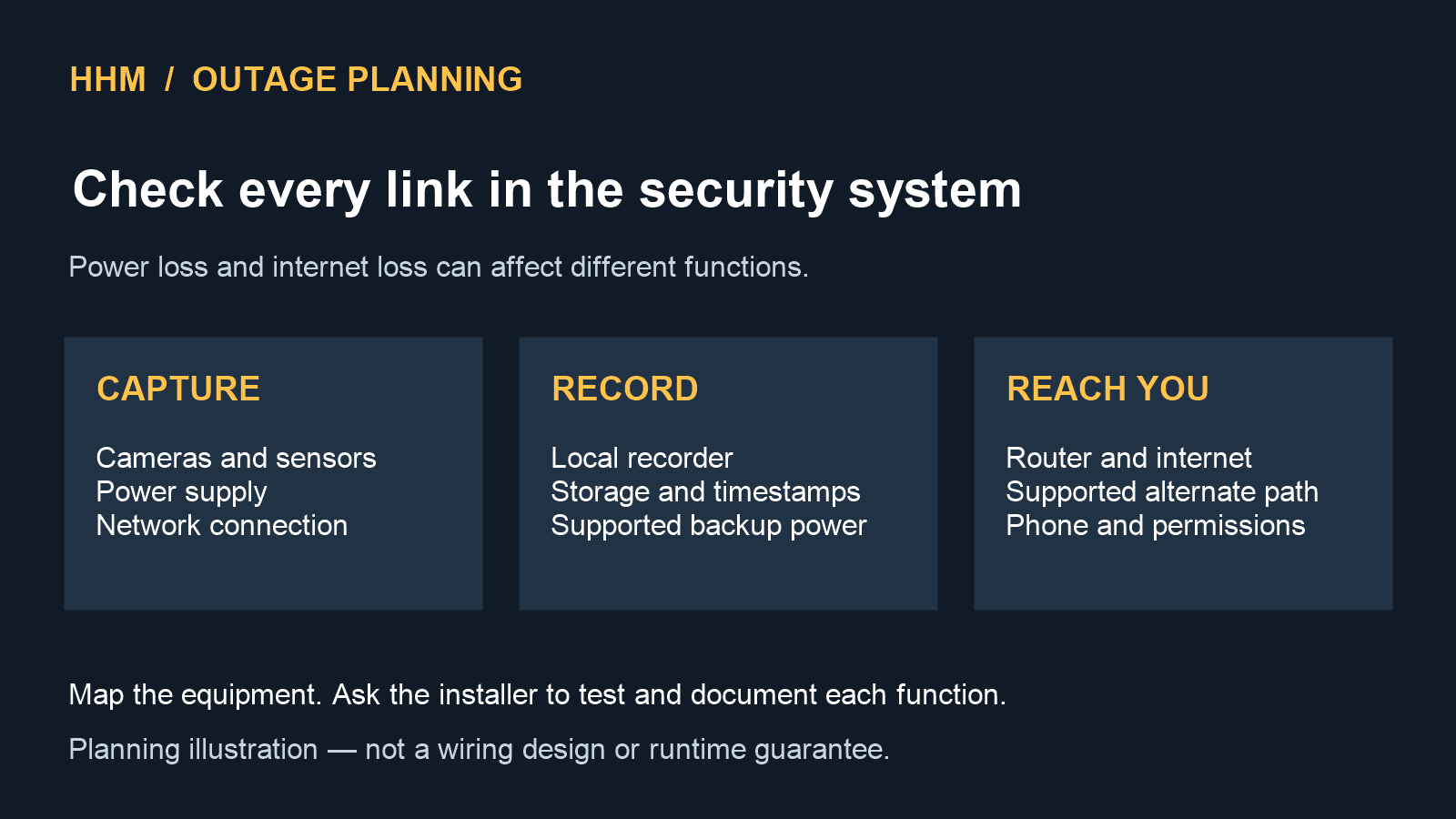
A security system can look complete on an ordinary day and still have hidden weak points during a power or internet outage. A camera may have backup power while the network switch does not. A recorder may continue saving video locally while remote alerts stop. A cellular communicator may restore a notification path without powering the cameras that create the event.
For Carolina homeowners, the useful question is not simply whether a system has a battery. It is: which functions should continue, for how long, and through which dependencies? Answering that question before installation produces a more understandable system and a much better commissioning test.
This guide is a planning framework, not a promise that any system will operate through every event. Actual performance depends on the selected equipment, network design, battery condition, communications service, electrical conditions, maintenance, and the circumstances of the outage.
Start with a dependency map
Draw the system as a chain instead of treating “security” as one device. A typical camera and alarm plan may depend on:
- cameras, doorbells, sensors, keypads, and sirens;
- camera power supplies or a Power over Ethernet (PoE) switch;
- a local network video recorder (NVR) or other storage device;
- the router, Wi-Fi access points, modem, fiber terminal, or other internet equipment;
- a cloud service or mobile application used for remote viewing and alerts;
- cellular or other backup communications, when included;
- the homeowner’s phone, permissions, account access, and notification settings; and
- every power supply, surge device, receptacle, battery, and generator connection supporting the chain.
A labeled diagram makes hidden dependencies visible. If the NVR and cameras are on backup power but the PoE switch is not, local recording may stop. If the complete local system remains powered but the modem or neighborhood internet service is down, recording may continue while remote viewing and cloud alerts do not. The correct design follows the functions you want to preserve.
Define the required behavior for two different outages
Power loss and internet loss are not the same event. Write a short operating requirement for each one.
When the internet fails
Decide whether cameras and sensors should continue operating locally, whether video should continue recording to an on-site recorder, which controls should remain available inside the home, and whether a separate communications path is needed for selected alerts. Some products depend heavily on a cloud connection; others provide more local operation. Confirm the behavior of the actual equipment instead of assuming that all products work alike.
When utility power fails
List the devices that must stay powered and the desired operating period. That list may include the alarm panel, cameras, PoE switch, recorder, router, internet terminal, cellular communicator, and any access-control equipment. A battery attached to only one device does not protect the rest of the chain.
Also define what should happen when backup power is nearly depleted: continue every function, preserve only priority devices, or shut equipment down in a controlled way. The choice affects battery sizing, heat, cost, maintenance, and the complexity of the installation.
Separate local recording from remote access
“The cameras are working” can mean several different things:
- the camera still has power;
- the camera is still connected to the local network;
- video is still being recorded locally;
- the homeowner can still view video inside the home;
- remote viewing still works outside the home; or
- alerts still reach the intended people.
Test and document each function separately. Local recording can reduce dependence on the internet, but it still relies on powered cameras, a functioning network path, a recorder, healthy storage, correct time settings, and sufficient capacity. Cloud recording can add off-site access, but it depends on the camera’s path to the service. A resilient plan can use both approaches when the selected equipment supports them, but neither should be described as failure-proof.
Size backup power from measured loads
A UPS should be selected from the actual connected load and the required operating time—not from a broad runtime claim. Count every supported device, confirm each manufacturer’s power requirements, and allow for startup behavior, conversion losses, battery aging, and environmental conditions. The final design should stay within the ratings of the UPS, power supplies, PoE switch, branch circuit, and connected equipment.
Runtime estimates are planning numbers until the completed system is tested under a representative load. Record the installation date, battery replacement guidance, test method, and test result. A battery that is never inspected can create false confidence.
Surge protection, grounding, and lightning exposure should also be reviewed as part of the electrical and low-voltage design. Backup power keeps equipment running for a period; it does not by itself address every surge or wiring hazard.
Understand what cellular backup can and cannot do
Cellular backup may provide an alternate communications path when the primary internet connection is unavailable. It does not automatically power cameras, network equipment, recorders, or alarm devices. It also depends on compatible equipment, an active service, local signal conditions, and the way the system is configured.
Ask which events use the alternate path, whether remote video is supported or only selected signals, how the system reports a failed primary connection, and what happens after service is restored. Confirm those answers with the selected equipment and service documentation.
Treat generator power as an electrical and life-safety project
If a generator is part of the outage plan, the security system is only one of the loads that must be coordinated. Permanent generator connections and transfer equipment should be designed and installed by qualified professionals under the applicable requirements. Never improvise a connection or backfeed a home’s wiring.
Portable generators introduce a serious carbon-monoxide hazard. The U.S. Consumer Product Safety Commission says to operate them outdoors only, at least 20 feet from homes and buildings, with exhaust directed away from windows, doors, and vents. Follow the generator manufacturer’s instructions and maintain working carbon-monoxide alarms. Review the current CPSC carbon-monoxide guidance before an outage—not while the power is already off.
Restore service without weakening security
During recovery, keep strong unique passwords, multi-factor authentication where available, current software, secure router settings and appropriate user permissions. Do not turn off protections just to restore remote viewing. The FTC camera-security guide explains these controls. The NIST consumer IoT profile provides useful questions about secure configuration, updates and support. Ask the installer to document how the selected system restores those controls after an outage.
Plan space for backup equipment during construction
New construction and remodeling provide an opportunity to place cables and equipment deliberately. Plan camera views before rough-in, select a dry and ventilated equipment location, label both ends of every cable, allow service access, and provide suitable power for the recorder, network, and backup equipment. Keep low-voltage work coordinated with electrical, HVAC, cabinetry, insulation, and finish work.
For a broader prewire checklist, review HHM’s security system installation planning guide. You can also use the security system planning calculator to organize camera, coverage, recording, and installation needs before requesting a proposal.
Commission the outage behavior before relying on it
A completed installation should be tested in controlled conditions. Do not create unsafe electrical conditions or disconnect life-safety equipment to perform a test. Coordinate the procedure with the installer and any monitoring or communications providers involved.
A useful commissioning record can include:
- the normal operating state and all device indicators;
- a controlled loss of the primary internet connection;
- confirmation of local recording, local controls, and expected alert behavior;
- a controlled transition to backup power;
- measured UPS load and observed operating time;
- confirmation that timestamps remain accurate;
- the restart order after utility power and internet service return;
- confirmation that remote access returns securely;
- the location of documentation, recovery codes, and support contacts; and
- the next scheduled battery, storage, update, and access review.
Repeat the test after material equipment, network, account, or service changes. A written result is more useful than a vague statement that “the backup worked.”
A homeowner handoff sheet for an outage
Before installation is signed off, ask the installer to complete a one-page record for your North Carolina or South Carolina property. Keep it with the equipment manuals, not in a public project form. The record should name the actual equipment and observed results rather than repeat a general claim that the system has backup.
- Local recording: identify which cameras recorded during the agreed internet-loss test and where the recordings were retrieved.
- Remote access and alerts: record which functions stopped, which continued, and any separate service needed. Do not treat an on-screen camera image as proof that alerts reached a phone.
- Backup power: list every connected device, the test load, observed operating time, and the installer’s battery-maintenance instructions. Leave untested runtime blank.
- Recovery: record who checked timestamps, recording, secure remote access, and notification delivery after normal service returned.
- Ownership and support: name the account owner, support contact, update method, and next review date. Store passwords and recovery codes separately in a secure place.
This is a documentation checklist for an installer-led test, not a homeowner electrical test procedure. For an occupied home, rental, or active jobsite, agree on the test window and affected occupants beforehand. Never disable life-safety equipment or improvise electrical connections to complete it.
Build the plan around the outcome you need
The most dependable security proposal begins with specific outcomes: which areas need coverage, what should record locally, who should receive alerts, which functions must remain during internet loss, which devices need backup power, and how recovery will be verified. That makes equipment selection easier to compare and exposes tradeoffs before walls are closed or devices are mounted.
Start with HHM’s security planning calculator, then use the installation planning page to request a site-specific review.
Review a current HHM installed-system option
For customers who want a defined equipment-and-installation starting point, HHM currently lists the HHM Essential 4-Camera Security System — Professional Installation. Use the product page to review current package details. Final camera placement, cabling, recorder and storage configuration, network design, backup power, taxes, site conditions, installation scope, and commissioning remain subject to the written proposal and property review.
Authoritative sources
- CPSC Carbon Monoxide Information Center — portable-generator placement and carbon-monoxide safety; reviewed October 1, 2026.
- FTC: How To Secure Your Home Security Cameras — account, network and remote-viewing protections; reviewed October 1, 2026.
- NISTIR 8425: Consumer IoT Core Baseline Profile — product cybersecurity capabilities and support questions, not equipment certification; reviewed October 1, 2026.